
Scaling SEO Rebranding: How I Built an AI Agent to Save 40 Hours of Manual Work
Introduction
I want to share with you some recent work I did for a client to create an internal tool that reduced delivery time of the project by one full week using Gemini CLI and AI. The client had a tight deadline to finish the rebrand by early February.
What this project shows is how it's possible to cut time + costs by building and deploying agentic AI systems that can automate work.
This is a project I did as a technology consultant for an organization with 30+ members of advisory boards and staff, and has various partnerships with other organizations.
For confidentiality reasons, I need to withhold the name of the organization, the nature of our work, and some details of the project I worked on.
The Goal
The organization is undergoing a rebrand and asked me to help them update their SEO metadata for about 255 web pages they have in Webflow. Some pages are static and some use dynamic data in the Content Management System (CMS). The business needed a consistent brand voice across all Webflow pages, but manual updates risked inconsistency and a delayed site launch.
My Role
While I was tasked with updating the SEO metadata, I identified the workflow inefficiencies and acted as the Product Owner and Developer for the internal tool to architect a solution. Building the tool would ensure consistent quality while meeting the aggressive February deadline.
The End Result
I built several Gemini CLI Skills that automated updating the SEO metadata for 255 pages. This reduced total delivery time from an estimated 64 hours to 24 hours (62% efficiency gain).
The Inefficient Workflow
Without the help of AI, in order to do the work, I would need to:
- Manually visit and read each of the 255 pages to understand the existing content
- Use the Webflow Designer to view and save the current SEO metadata into a document as a backup
- Write SEO page Titles and page Descriptions that incorporated the new brand name and expanded scope of services
- Have the SEO metadata reviewed by staff (either me or someone else)
- After approval, copy the SEO metadata from the document into the Webflow Designer
- Publish the changes in Webflow
The Efficient Workflow
With the help of AI the workflow now looks like
- With Gemini CLI open, ask the Gemini AI to update the Webflow SEO for the URL: <paste in the URL>
- Review an edited document to see the old and new SEO metadata, as well as the AI's rationale for why it suggested the new SEO Title and Description
- Once approved, in Gemini CLI ask the AI to push the changes from the review document to Webflow
- Publish the changes in Webflow
What's wonderful about this workflow is I can stay inside Gemini CLI and Obsidian (a notetaking/document writing tool) without having to bounce back and forth between the Webflow Designer in my web browser too often.
My Process for Building the AI Internal Tool
After installing and setting up Gemini CLI, I gave the Gemini AI links to documentation on Skills: https://geminicli.com/docs/cli/skills/ and the tutorial https://geminicli.com/docs/cli/tutorials/skills-getting-started/
Through the chat, I asked the Gemini AI to create a Skill that has the context of the organization's rebrand project. I also instructed it on the task; updating the SEO metadata to reflect their new brand.
This gives the AI context to ground the work and tasks it needs to do. I cannot state enough just how critical this step was. Having someone like myself who understands how to give AI just enough context, not too little, and not too much lays the foundation for it to succeed in workflows. This is called Context Engineering and it’s an important skill (for people) in developing AI applications and workflows.
The Skill (for the AI) fetches the web page content (the same content people read on the page). This is so it can understand the page content and purpose of content.
It also fetches the SEO page Title and Description metadata by using a custom python script. This is important so it knows what the current SEO metadata is and can improve it for SEO optimization.
It then analyzes the quality of the SEO metadata against the page content, and crucially the intended rebrand. This is where the Context Engineering I did in building the SKILL.md file comes in. Knowing the organization's rebranding goals, and the current page content, it will propose new SEO metadata.
The new metadata is written by the AI into a markdown file that I read through my Obsidian notetaking app. It formats the data in a before/after table so I can clearly see the improvements it suggests. It also includes its rationale for the changes.
Example output (data has been changed to protect client)
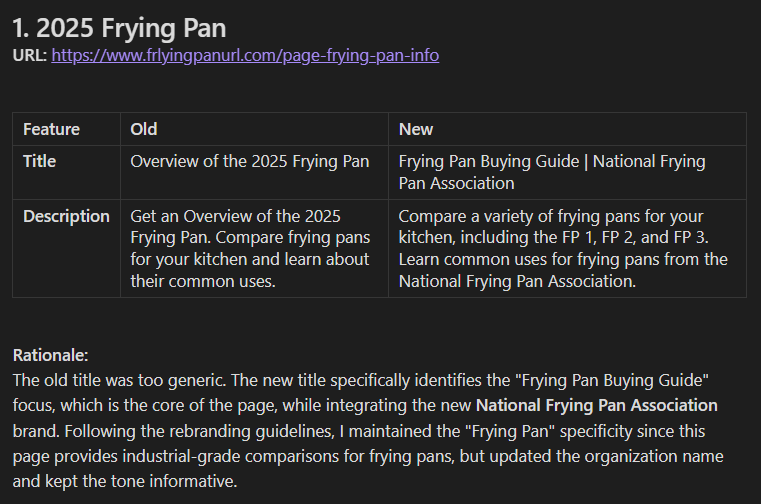
I added the table because it reduced cognitive load and allowed me to process the information quickly as I evaluated if the metadata correctly incorporated the rebrand.
This review process of the AI's work before it makes any changes is called a Human-in-the-Loop flow. This is critical to ensure safe, consistent, and reliable AI workflows in business operations.
Early on in the project I was copying and pasting the SEO metadata from the markdown file, but later decided to iterate on the workflow. I created a new, separate Skill for the AI to push the SEO changes to the Webflow API directly. This eliminated the need for manually copying and pasting SEO metadata from my markdown document into the Webflow Designer. It also served as a security and quality gate to minimize risk of the AI pushing updates with poor quality SEO metadata.
I could have put this ability inside the initial Skill I created, but keeping it separate further protects any accidental publishing of metadata before it's been reviewed by people. The fact that it requires a person to instruct the AI to publish the metadata changes ensures the Human-in-the-Loop pattern.
All in all, this AI workflow automated a 255-page SEO rebranding project, reducing total delivery time from 64 hours to 24 hours (62% efficiency gain).
Lessons Learned
Nearly every enterprise grade SaaS tool has an API. Using the Agent Skills framework is a powerful way to allow AI to access APIs and automate work that meets safety, consistency, and quality standards.
Contact
If you are a business interested in leveraging AI to streamline workflows towards your business objectives, you may contact me at reid -at- reidkimball.com.